Pages

Showing posts with label learn. Show all posts

Monday, 8 December 2014

Using light and shadow text photoshop

In this tutorial we are going to take some very basic principles of light and shade to make a rather impressive-looking text effect.
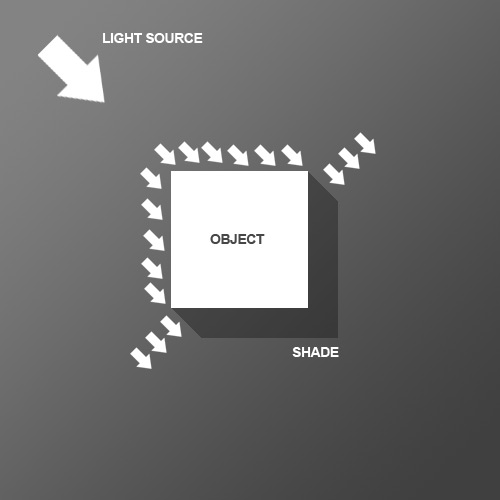
So before we start the tutorial, here is a little diagram about how light might hit an object. Here we have a square object in the middle with light coming from the top left. You can see that where the light hits the object, a shadow is cast on the other side. Note that the shadow is not a Photoshop drop shadow, which makes the object look like it's hovering above the canvas. Here we want the object to look like it's a three dimensional thing stuck on the canvas, extruding if you like. Now tell me what other Photoshop tutorial site gives you diagrams? It's like being back in school!
Monday, 24 February 2014

coming Home Photo Manipulation in Photoshop

Today we are going to create a fantasy in space atmosphere in our manipulation.So get ready for a colorful scene using tone correction,color balance,layers adjustments,lighting effects in Photoshop.

Final Result

small

Thursday, 26 May 2011

Creating a Mac-Type Background in Photoshop


This tutorial is about making a “mac” style background. You can use these in all sorts of situations, including the obvious –your desktop– as well as part of your designs or for corporate work (Powerpoint presentations, Flash work, etc). Naturally, you wouldn’t want to use this exact set of steps, but following them will give you a good idea of the technique. Good luck!

Step 1:

We begin with a blank canvas and then draw a subtle gradient across it. (I’m using a 1280×1024 canvas here.)

Text