Pages

Showing posts with label tutorials. Show all posts

Tuesday, 9 December 2014

“Imperfection” Abstract Photo Manipulation in photoshop

In this Photoshop tutorial I’ll show you how to create an emotional, abstract photo manipulation. You’ll learn how to combine abstract elements, work with groups, create depth of field and more.

Final Image


Create the Abstract Photo Manipulation Imperfection

Monday, 8 December 2014

Using light and shadow text photoshop

In this tutorial we are going to take some very basic principles of light and shade to make a rather impressive-looking text effect.
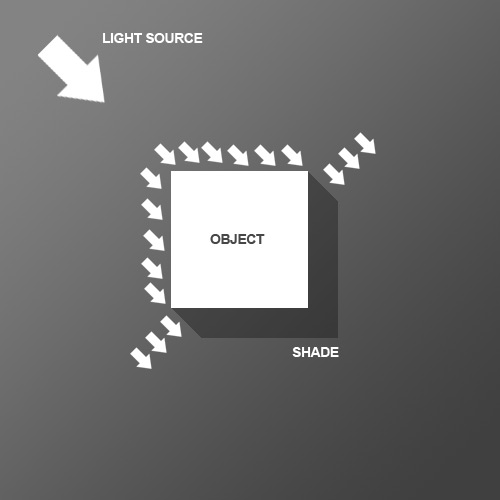
So before we start the tutorial, here is a little diagram about how light might hit an object. Here we have a square object in the middle with light coming from the top left. You can see that where the light hits the object, a shadow is cast on the other side. Note that the shadow is not a Photoshop drop shadow, which makes the object look like it's hovering above the canvas. Here we want the object to look like it's a three dimensional thing stuck on the canvas, extruding if you like. Now tell me what other Photoshop tutorial site gives you diagrams? It's like being back in school!

Sunday, 7 December 2014

Create a Button in photoshop

In this simple tutorial, we're going to create a clever little way of making little buttons using a couple of layers and one interchangeable image layer. As always you can download the sample PSD at the bottom of the tutorial to follow along and copy layer styles out of.
Start by drawing in a colored background. I've used dark brown/greys here and used a subtle radial gradient. Then in a new layer, draw a circle and fill it with a color. It doesn't matter what color you use; I've used green here.

Wednesday, 3 December 2014

Create Custom Smoke Brushes in Adobe Photoshop

Final product image
What You'll Be Creating
Smoke trails are elegant, beautiful, and amazing to watch. Thin wisps of smoke dancing through the air reveal just how fluid our atmosphere really is. The effect is deceptively simple, and the dynamics of it are dazzlingly complex. 
Recreating believable smoke in a digital environment is no easy task. However, capturing the practical effect is a much easier prospect. In this quick tip, I'll share a technique that I use to create stunningly beautiful custom smoke brushes in Adobe Photoshop.

Saturday, 22 November 2014

How to create a Map Icon in photoshop

Final product image
What You'll Be Creating
You don't have to use 3D software just to create a simple three-dimensional icon. Photoshop can do that too using some simple tricks with gradient color, highlight, and shadow. Here, we are going to use these tricks to draw a map icon. Let's get started!

Wednesday, 5 March 2014

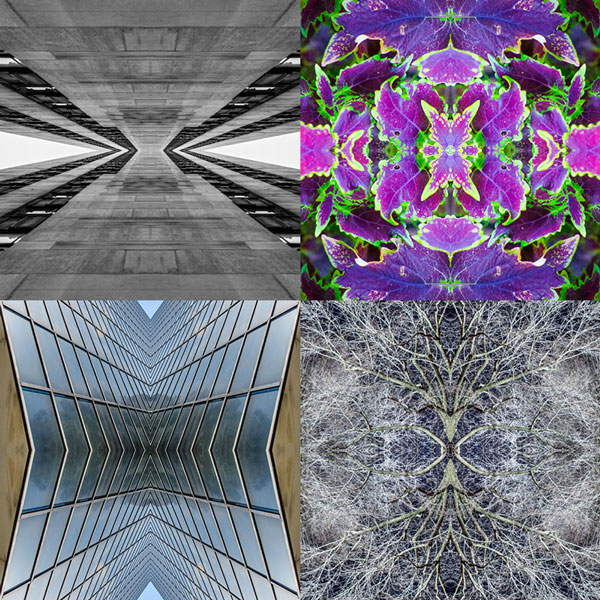
Photoshop Kaleidoscope Effect Create free


Photography is a skill that I believe most designers should have at least a fundamental understanding of. You never know when you might need to run out and shoot a photo of your own for a project. Personally, I love to shoot photos, and it is nice to have a good catalog of photos in my arsenal, just in case.

Friday, 31 May 2013

How to Create a Futuristic Jumping Whale

In this tutorial you will learn how to create a futuristic, metal jumping whale. We are not actually creating the metal whale, but we are using 5 stock images and a brush set, along with Photoshop’s built in tools and filters to create this stunning photo manipulation.

Final Image

How to Create a Futuristic Jumping Whale in Photoshop

Friday, 9 September 2011

30 Photoshop Tutorials To Create Fantastic Art


Jade Fox
Using photoshop you can do amazing things. You can manipulate photos, create textures or create beautiful art. There are always new things to learn about photoshop and there is never end to it. Creating beautiful art using photoshop is a real fun. You can give artistic touch to scanned or hand drawn pictures. Here i have listed 30 photoshop tutorials to create fantastic art.

Wednesday, 20 July 2011

How to Createa a Vector sketchbook


In this tutorial, I will show you how to create a customizable vector sketchbook. This intermediate tutorial uses some basic shapes, Shear transforms, and Effects to create a leather texture. Let’s get started!

Final Image

Below is the final image we will be working towards. Want access to the full Vector Source files and downloadable copies of every tutorial, including this one? Join Vector Plus for just 9$ a month.
sketchbook_final_image

Saturday, 4 June 2011

Metal Text Effect In Adobe Photoshop


Written By A-Z World
In this Photoshop text effects tutorial, we'll learn how to easily create metal text, a popular effect widely used in video games and movie posters! It may seem like there's a lot of steps involved, but once you've done it a few times, creating the effect won't take you more than a few minutes from start to finish. To create the metal texture itself and apply it to the text, we'll be using a couple of layer styles, some filters, layer blend modes, and a clipping mask! I'll be using Photoshop CS5 for this tutorial but any recent version of Photoshop will work.
Here's the final result we'll be creating:
Photoshop metal text effect. Image © 2010 Photoshop Essentials.com.

Text