Pages

Showing posts with label online learn. Show all posts

Friday, 2 January 2015

Compositing techniques in Advace

Intro
This photomontage by Serbian illustrator Mr. Zahid was created for an haute couture fashion editorial called Silent Spring that appeared in her home country’s Faar magazine. It showcases the brightly coloured clothes and shoes of designer Ana Ljubinkovic, which are perfectly complemented by Vesna’s high-end photo-illustration style.

The work features photographic elements shot by Miloš Nadaždin (milosnadazdin.com) in his studio, and hand-drawn type and elements created by Mr. Zahid.

In this tutorial, you’ll learn how to incorporate all these elements into one image and get a dreamy, surreal atmosphere inspired by nature. Mr. Zahid explains how to make ceramic facial masks that match a model’s face and how to give vector lettering a three-dimensional look. She also looks at how textures can be used to enhance an atmosphere and how adjustment layers can integrate unusual elements.

Monday, 8 December 2014

Using light and shadow text photoshop

In this tutorial we are going to take some very basic principles of light and shade to make a rather impressive-looking text effect.
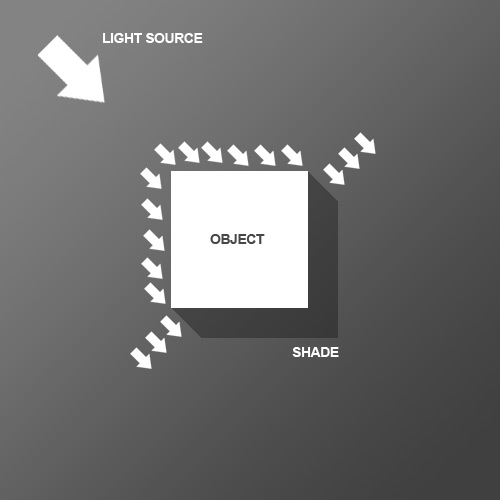
So before we start the tutorial, here is a little diagram about how light might hit an object. Here we have a square object in the middle with light coming from the top left. You can see that where the light hits the object, a shadow is cast on the other side. Note that the shadow is not a Photoshop drop shadow, which makes the object look like it's hovering above the canvas. Here we want the object to look like it's a three dimensional thing stuck on the canvas, extruding if you like. Now tell me what other Photoshop tutorial site gives you diagrams? It's like being back in school!

Friday, 21 November 2014

Potrait into a Zombie

In this Photoshop tutorial I’ll show you how to turn a portrait into a zombie. You ‘ll learn how to use adjustment layers, combine stock images and work with textures.

Final Image


zombie

Sunday, 8 January 2012

Make a Classic Air Mail Envelope with Adobe Illustrator


A happy holiday Quick Tip with Ryan shows us how to create a classic envelope in Adobe Illustrator, using simple shapes, effects, and gradients. After your envelope is created, some simple shadows and gradients create a warm background that makes the envelope look good enough to mail to Santa. I wonder if LoungeKat got him anything for Christmas?

Monday, 26 September 2011

29 Photoshop Tutorials For Learning photoshop

In this tutorial, I’ll show you how to create a futuristic looking photo manipulation using some special tools, such as the Background Eraser Tool and how to blend pictures properly using Match Color Adjustments and Lighting Effects. So let’s start!

1. How To Create the Photo Manipulation “Brightness Tomorrows”smoke-island

Wednesday, 27 July 2011

Explosive 3D Text Effect


Announcing the first tutorial of a new series!
Together, with a pinch of this and a dash of that, we’ll figure out how to create this cool effect in just 30 minutes.
Ingredients:
1 normal, everyday Photoshop

Monday, 25 July 2011

Spirit Dove in photoshop


In this tutorial, we are going to create a dove like spirit bursting out of a woman's body amidst the cloudy sky. This tutorial uses a basic filter of glowing edge to create those shiny outlines engulfing the objects.

Start off with a basic black background, and have all of the elements nicely masked of its background. Place it accordingly.

Hide the dove for now as we will be focusing on the woman. Since we will be needing multiple instances of the woman layer, duplicate it a few times.

Thursday, 14 July 2011

making a dreamscape in photoshop


Materials needed -


Woman stock –

Rose petals -

Pigeon -

Swan – 

Sky – 

Sea -

Step 1

For this tutorial we are using another stock image from mjranum-stock. Open the model image in photoshop and start extracting the woman from the background. I used the Pen Tool (P) and instead of erasing the background I used a layer mask. After masking the background I reduced the size of the image to 1200×616 pixels

Sunday, 26 June 2011

Magic School Photo Manipulation in Photoshop


In this tutorial we will be covering some very interesting topics on Matte Painting and Photo Manipulation such as planning a concept, pre-visualizing, and using images as references.  This tutorial not only shows some techniques but also helps in improving logical thinking while creating a fantasy scene.

“Magic School” Photo Manipulation Photoshop Tutorial

Step 1

Create a new canvas in Photoshop with the resolution of Width=2560px and Height=1485px.

Saturday, 25 June 2011

Without Using Any Images Creating a Vortex Texture Effect


Photoshop contains a variety of combinations, for instance, using Difference Clouds for your texture effect. The tutorial below is another example for beginners trying to experiment the vortex texture effect without using any images. Please feel free to apply the difference filter or setting during the process and I am sure that you also can find unlimited possiblilities for texture effects.


Thursday, 16 June 2011

Create a Surreal Out of Bounds Photo Manipulation in Photoshop


In this tutorial we will combine several images of water, animals, and people to create a surreal out of bounds photo manipulation in Photoshop. Let’s get started!

Thursday, 9 June 2011

A Speeding Car Scene With Light Effects In Photoshop


Today we will be creating a composition that blends together various stock images to create a cohesive scene. In addition, we will be using some cool Photoshop tricks to add light effects to the design. Many of these techniques can be applied to your own unique designs – so let’s get started!

This tutorial is in part inspired by Pete Harrison’s awesome composition ‘Super Highway’. Check out his portfolio here.

Monday, 30 May 2011

With Photoshop Create a Spiral Telephone Cord From Scratch


Final Product What You'll Be Creating

Given the right tools, Photoshop can make just about any task easy. Today’s tutorial will demonstrate how to create a still life telephone scene from scratch using the smudge tool. Let’s get started!

Tuesday, 24 May 2011

Metallic Styles in Photoshop


In this tutorial, we’re going to create a metallic effect using layer styles and gradients that you can apply to different objects. We’ll put it on a nice background and create a style for lettering that makes it look like it’s embedded into the metal. You can download the sample PSD file from the link at the bottom of the tutorial if you’d like to simply copy+paste the layer styles.

Tuesday, 17 May 2011

How to Create a Flaming Photo Manipulation


Final Product What You'll Be Creating

In this tutorial, we’ll manipulate a picture so it looks like a woman burning in flames. The idea behind this manipulation was to create a nice looking illustration, only by using simple techniques and tools such as the Brush tool and Warp command. I hope you enjoy the tutorial and try it with your own stock imagery.

Friday, 13 May 2011

Create a Magical Four Piece Stardust Composition


Final Product What You'll Be Creating


Create a Magical Four Piece Stardust Composition
For whatever reason it is always fun to create composite images that use star fields as a backdrop. Star fields have a unique ability to make a composition look mysterious and even magical. In today’s tutorial we will demonstrate how to create a 4-piece stardust composition using textures and masks. Let’s get started!

Text