Pages

Showing posts with label learn photoshop online. Show all posts

Friday, 21 November 2014

Potrait into a Zombie

In this Photoshop tutorial I’ll show you how to turn a portrait into a zombie. You ‘ll learn how to use adjustment layers, combine stock images and work with textures.

Final Image


zombie

Tuesday, 4 March 2014

World War II Era Dogfighter in photoshop


In design, great concepts can often be created by playing with words. In this tutorial, our friends at INK will show you how to create a furry World War II era aircraft, that we are calling a "dogfighter" using a handful of photos and a 3D model. Let's get started!

Thursday, 23 June 2011

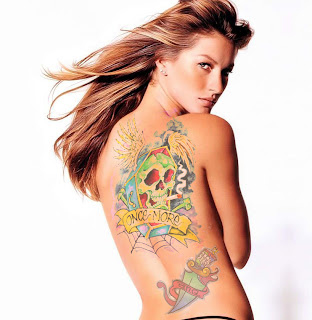
Easy To Add Color Tattoo On Body Make Sexy In Photoshop


Easy to Add realistic tattoo and body Make Sexy art in this Photoshop tutorial using masking And color adjustment, liquify and the re size and transformation tool,This tutorial will show you how you can insert a tattoo design to a photograph with only couple of simple steps in photoshop.

Final Image.

tatoo add sexy Easy To Add Color Tattoo On Body Make Sexy In Photoshop

Wednesday, 1 June 2011

How to Create Eroded Metal Text with Photoshop


In this tutorial I’ll show you how to create an eroded metal text effect. Throughout this tutorial we’ll make use of various drawing techniques, channels, and patterns. Let’s get started!

Final Image 

Step 1

First we need to define a pattern of dots. Lets start by creating a new document 100 pixels wide and 100 pixels high, with a Resolution set to 300 pixels/inch. Fill the "Background" layer with black. Grab the Elliptical Marquee Tool, set the Style to a Fixed Size and set the Width and Height to 24 pixels. Click anywhere inside the canvas, then click inside the selection, drag and position it in the top-left corner of the canvas.

Thursday, 26 May 2011

Creating a Mac-Type Background in Photoshop


This tutorial is about making a “mac” style background. You can use these in all sorts of situations, including the obvious –your desktop– as well as part of your designs or for corporate work (Powerpoint presentations, Flash work, etc). Naturally, you wouldn’t want to use this exact set of steps, but following them will give you a good idea of the technique. Good luck!

Step 1:

We begin with a blank canvas and then draw a subtle gradient across it. (I’m using a 1280×1024 canvas here.)

Wednesday, 25 May 2011

Making a Message Strip in Photoshop


In this tutorial, we’re going to make a little message strip in Photoshop that you can place in the top-right corner of a design. These little strips look very trendy and Web2.0-y, particularly in Web designs! It’s quite an easy effect to do, and in this tutorial we’ll add some shadow and light to make it pop!

Step 1:

To begin this tutorial as always, we will start with a nice radial gradient. I am addicted to radial gradients, so you should be too! I’m using a combination of nice blues. Here are the exact color codes:
Color 1 – #0e324f
Color 2 – #062033

Tuesday, 24 May 2011

Metallic Styles in Photoshop


In this tutorial, we’re going to create a metallic effect using layer styles and gradients that you can apply to different objects. We’ll put it on a nice background and create a style for lettering that makes it look like it’s embedded into the metal. You can download the sample PSD file from the link at the bottom of the tutorial if you’d like to simply copy+paste the layer styles.

Thursday, 19 May 2011

Create a Post-Apocalyptic Matte Painting


Final Product What You'll Be Creating

In the movies, we often see images of ruined landscapes or apocalyptic cities. What many of us don’t know however is that much of this imagery was produced not with complicated CG software but instead, using Photoshop. In today’s tutorial we will demonstrate how to create a post-apocalyptic matte painting of an old cathedral. Let’s get started!

Saturday, 14 May 2011

How to Create a Fantasy Banana Ship in Photoshop


Final Product What You'll Be Creating

One of the best things about Photoshop is that it allows us to create some pretty amazing images from some of the most surprising objects. Today, we will create a fantasy flying ship from a photo of a banana. Let’s get started!

Create an Open Book Icon In Photoshop


Final Product What You'll Be Creating

Most people don’t realize how much time and effort goes into creating something like an icon. Icons can take many hours to complete and the techniques used can take a long time to perfect. In this tutorial we will demonstrate how to create an open book icon in Photoshop. Let’s get started!

Tuesday, 10 May 2011

Blend Photos Like A Hollywood Movie Poster In Photoshop

In this Photoshop tutorial, we're going to learn how to blend photos together like a Hollywood movie poster. Blending photos is easy to do in Photoshop thanks to layer masks, yet finding two photos with similar colors isn't always so easy, and you end up with a photo effect that doesn't really seem to look right because the colors don't match.
With this technique, you don't need to worry about the colors in the images at all because we'll be removing them completely and adding our own colors to blend the two photos seamlessly.
Blending photos in Photoshop like a Hollywood movie poster.

Text