Pages

Showing posts with label free learn photoshop. Show all posts

Tuesday, 9 December 2014

“Imperfection” Abstract Photo Manipulation in photoshop

In this Photoshop tutorial I’ll show you how to create an emotional, abstract photo manipulation. You’ll learn how to combine abstract elements, work with groups, create depth of field and more.

Final Image


Create the Abstract Photo Manipulation Imperfection

Monday, 8 December 2014

Using light and shadow text photoshop

In this tutorial we are going to take some very basic principles of light and shade to make a rather impressive-looking text effect.
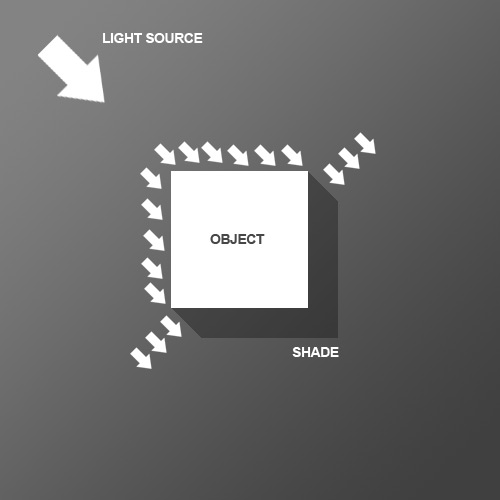
So before we start the tutorial, here is a little diagram about how light might hit an object. Here we have a square object in the middle with light coming from the top left. You can see that where the light hits the object, a shadow is cast on the other side. Note that the shadow is not a Photoshop drop shadow, which makes the object look like it's hovering above the canvas. Here we want the object to look like it's a three dimensional thing stuck on the canvas, extruding if you like. Now tell me what other Photoshop tutorial site gives you diagrams? It's like being back in school!

Thursday, 6 March 2014

Comprehensive Guide to Working Photoshop in Video


In this tutorial, I will explain the settings that are available for exporting video in Photoshop. In the process, you will learn how to save a video into an image sequence, as well as how to export a video after you have added adjustments and filters to it. Let's get started!

Tuesday, 4 March 2014

World War II Era Dogfighter in photoshop


In design, great concepts can often be created by playing with words. In this tutorial, our friends at INK will show you how to create a furry World War II era aircraft, that we are calling a "dogfighter" using a handful of photos and a 3D model. Let's get started!

Wednesday, 29 May 2013

Create Realistic Water Reflection Effect in Photoshop

In this tutorial we will create a realistic water reflection effect. You should be able to replicate this effect on other pictures using the techniques presented here.
This Photoshop tutorial uses some fairly advanced techniques but the detailed explanations at each step should make it easy for beginners to catch on.

Final Image

As always, this is the final image that we’ll be creating:
How to Create Realistic Water Reflection Effect

Monday, 15 August 2011

Futuristic Text Effect in Photoshop

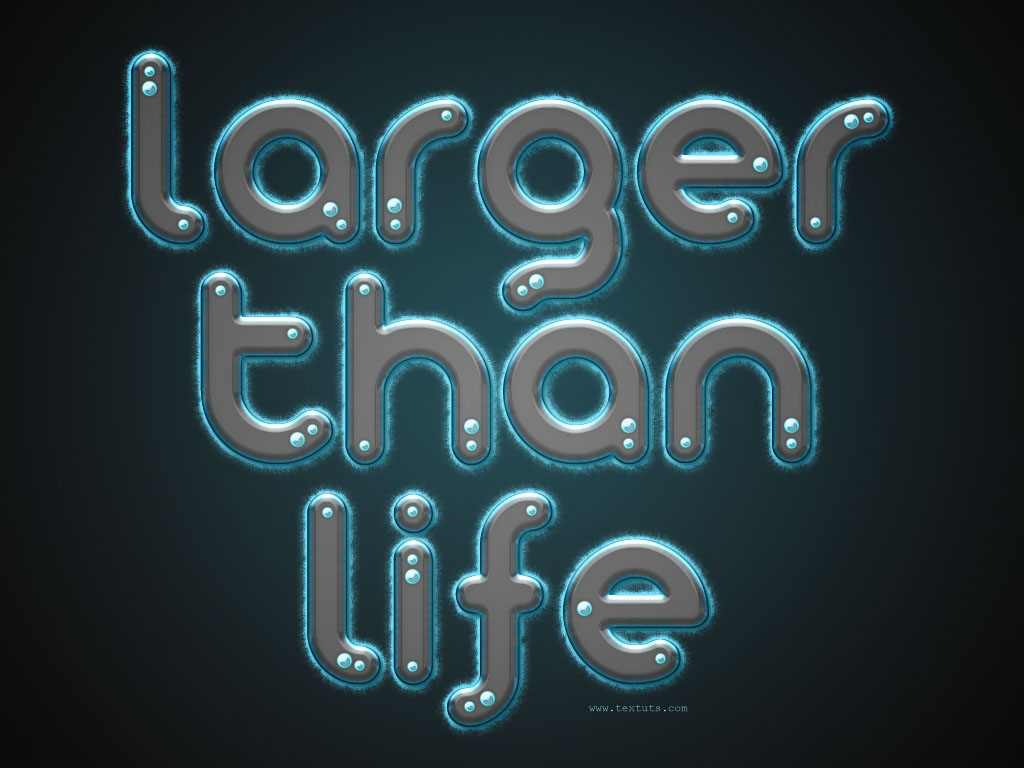
In this tutorial, we are going to create a glowing glossy futuristic looking text effect. Many layer styles will be applied to achieve this text effect, along with a nice brush trick to create the feathery fluffy stroke.
The Final Result:
Futuristic
Notes:

10 Greate Free Online photoshop Tutorials


Create a professional Romantic Comedy film poster in photoshop
photoshop-tutorials-2010-dec-11

you can learn how to work in photoshop and learn how to create a Professional Movie poster in Adobe photoshop .

Monday, 25 July 2011

Spirit Dove in photoshop


In this tutorial, we are going to create a dove like spirit bursting out of a woman's body amidst the cloudy sky. This tutorial uses a basic filter of glowing edge to create those shiny outlines engulfing the objects.

Start off with a basic black background, and have all of the elements nicely masked of its background. Place it accordingly.

Hide the dove for now as we will be focusing on the woman. Since we will be needing multiple instances of the woman layer, duplicate it a few times.

Wednesday, 6 July 2011

Rippling underwater explosion photoshop


Final - Result


Step 1: Creating the Bubbles
a) New PSD: 1024×768 @ 72dpi.b) Press D to make sure colours are default.c) Filter -> Render -> Fibers @ default options.d) ⌘I to Invert

Sunday, 26 June 2011

Magic School Photo Manipulation in Photoshop


In this tutorial we will be covering some very interesting topics on Matte Painting and Photo Manipulation such as planning a concept, pre-visualizing, and using images as references.  This tutorial not only shows some techniques but also helps in improving logical thinking while creating a fantasy scene.

“Magic School” Photo Manipulation Photoshop Tutorial

Step 1

Create a new canvas in Photoshop with the resolution of Width=2560px and Height=1485px.

Monday, 20 June 2011

3D Splashes Enhance Your Ad Designs


In this tutorial, I’ll show you a creative process that gets you using your crazy brain. The workflow for creating the splashes involves taking photographs of thrown paint. Through photography you can capture amazing 3D images without the need for 3D software. Learn to make a splash in your next design.

Thursday, 16 June 2011

Create a Surreal Out of Bounds Photo Manipulation in Photoshop


In this tutorial we will combine several images of water, animals, and people to create a surreal out of bounds photo manipulation in Photoshop. Let’s get started!

Monday, 6 June 2011

Design Surreal Composition Fallen Angel’s Dream Fly


Final Image

We were working on a rather big canvas, we started with 1024px × 764px new layer as these were the dimensions of our base image. However you may feel more comfortable working with smaller or bigger images.

Saturday, 28 May 2011

In Photoshop Create a Spectacular Grass Text Effect


Step 1

This tutorial is made up of three parts—the background, the text itself, and some final extra effects. So first of all we’re going to make a background. To do this we create a new document in Photoshop. I made mine 1920 x 1200 because I want this image to sit on my laptop background.
We start by drawing a Radial Gradient with the Gradient Tool (G) going from a light yellow-green (#adbf41) to a mid-range green (#328a26). I wonder if I’ve ever written a tutorial that doesn’t start with a radial gradient. 

How to Create an Incredible Typographic Illustration


Final Product What You'll Be Creating


All work and no play makes Jack a dull boy. In this two-part tutorial, we’re going to learn how to bring a simple proverb into a complex typographic illustration that achieves a level of realism without actually using any photos. Yes, we’re going to build this idea from the bottom up. In the first part, learn how to model your own objects in Cinema 4D and prepare them for isolation in Photoshop.

Thursday, 26 May 2011

Creating a Mac-Type Background in Photoshop


This tutorial is about making a “mac” style background. You can use these in all sorts of situations, including the obvious –your desktop– as well as part of your designs or for corporate work (Powerpoint presentations, Flash work, etc). Naturally, you wouldn’t want to use this exact set of steps, but following them will give you a good idea of the technique. Good luck!

Step 1:

We begin with a blank canvas and then draw a subtle gradient across it. (I’m using a 1280×1024 canvas here.)

Tuesday, 24 May 2011

Metallic Styles in Photoshop


In this tutorial, we’re going to create a metallic effect using layer styles and gradients that you can apply to different objects. We’ll put it on a nice background and create a style for lettering that makes it look like it’s embedded into the metal. You can download the sample PSD file from the link at the bottom of the tutorial if you’d like to simply copy+paste the layer styles.

Saturday, 14 May 2011

How to Create a Fantasy Banana Ship in Photoshop


Final Product What You'll Be Creating

One of the best things about Photoshop is that it allows us to create some pretty amazing images from some of the most surprising objects. Today, we will create a fantasy flying ship from a photo of a banana. Let’s get started!

Create an Open Book Icon In Photoshop


Final Product What You'll Be Creating

Most people don’t realize how much time and effort goes into creating something like an icon. Icons can take many hours to complete and the techniques used can take a long time to perfect. In this tutorial we will demonstrate how to create an open book icon in Photoshop. Let’s get started!

Text